Planning a wedding is exciting, but keeping track of every guest response can quickly become one of the most frustrating parts of the process. Between text messages, emails, WhatsApp conversations, spreadsheets, and last-minute changes, it can be surprisingly difficult to know exactly who is coming.
Fortunately, you don’t need a complicated wedding website or a collection of spreadsheets to stay organized. A dedicated online RSVP tool can bring all your guest responses together in one place.
In this guide, we’ll look at why online RSVP tracking is useful, what to look for in an RSVP tool, and how Confrmly can simplify the process for couples using printed or digital wedding invitations.
Why Tracking RSVPs Can Be So Difficult
At first, collecting wedding RSVPs might seem simple. You send invitations, ask guests to confirm their attendance, and wait for their responses.
The problem starts when those responses arrive through different channels.
One guest might text you. Another might send an email. Someone else might tell a family member that they’re coming. Then, a few weeks later, a guest changes their response or asks whether they can bring a plus-one.
Before long, you’re trying to keep track of information from multiple conversations.
A spreadsheet can help, but it still requires you to manually enter and update every response. For a large wedding, this can quickly become time-consuming.
That’s why many couples are moving toward online RSVP tracking.
What Is the Best Way to Track RSVPs?
The best way to track RSVPs is to give every guest one simple place to respond and keep all those responses connected to a single guest list.
Instead of asking guests to reply by text or email, you can provide one RSVP link.
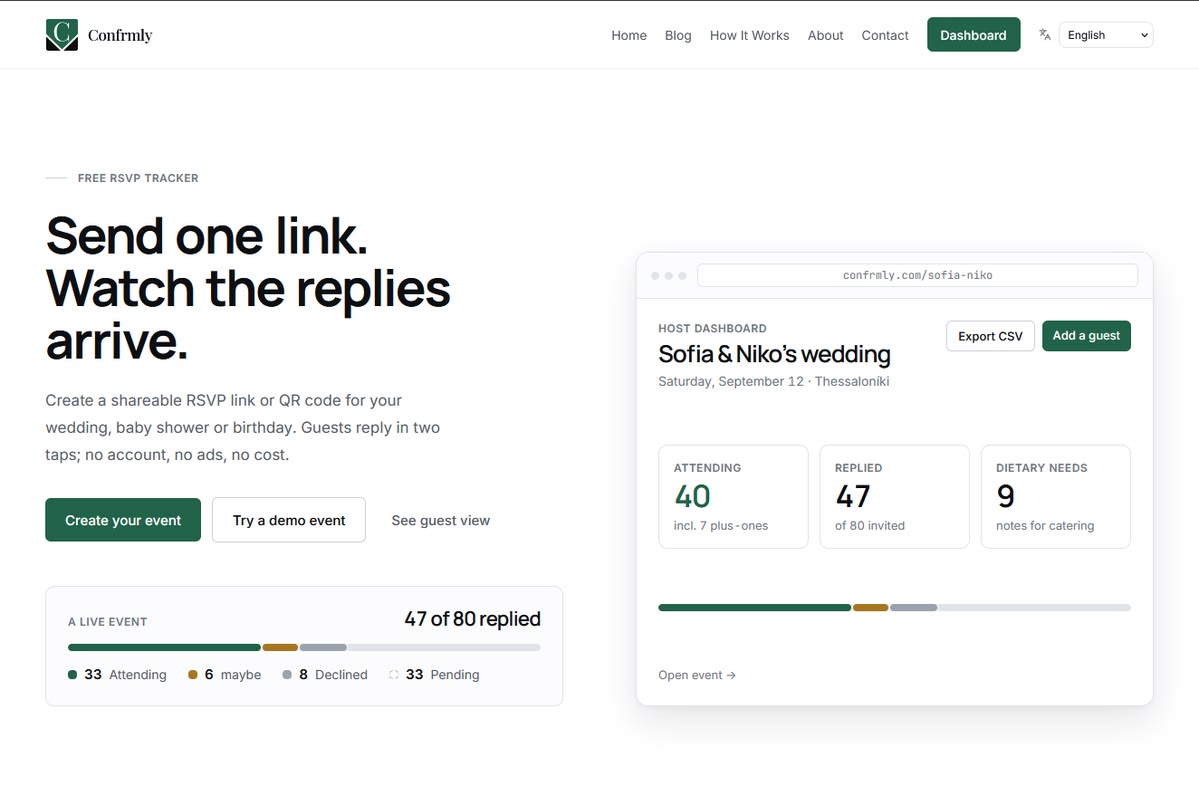
Guests open the link on their phone, select whether they’re attending, and provide any additional information you need. The responses are then organized in a central dashboard.
This approach has several advantages:
- All responses stay in one place
- You can see who has responded and who hasn’t
- Plus-one information can be collected
- Dietary requirements can be recorded
- Guest information can be updated when necessary
- The final guest list can be exported for planning
Confrmly is designed around this simple workflow. Hosts create an event and share a unique RSVP link, while guests can respond without creating an account or downloading an app.
Why Use a Free Online RSVP Tracker?
For many couples, the goal isn’t to build a complicated event-management system. They simply need an easy way to know who is coming.
A free online RSVP tracker can be especially useful for weddings, birthdays, baby showers, and other events where knowing the final headcount matters.
With Confrmly, you can create an event, share the RSVP link, and monitor responses through the host dashboard. Guests don’t need to register for an account, making the process simple for everyone involved.
This makes the RSVP process easier for both sides.
The host gets a centralized guest list, while guests get a quick form that doesn’t require another app or complicated registration process.
A Wedding RSVP Tracker Without a Wedding Website
One of the biggest advantages of using a dedicated RSVP tool is that you don’t necessarily need to create a full wedding website.
If you already have beautiful wedding invitations designed, there’s no reason to replace them with another platform simply because you need an RSVP form.
A wedding RSVP tracker can work alongside the invitation you’ve already created.
For printed invitations, you can add a QR code that takes guests directly to the RSVP page. For digital invitations, you can add a clickable RSVP button or link.
Confrmly supports this type of workflow. Couples can share a unique RSVP link or place a QR code on their printed invitation, while responses, plus-ones, dietary requirements, and table assignments can be organized through the host dashboard.

How an Online Wedding RSVP Works
The process can be much simpler than manually managing responses.
1. Create Your Event
Start by entering the basic details of your wedding, including the event name, date, time, location, and RSVP deadline.
You can also add an optional description or cover image to personalize the event.
2. Share Your RSVP Link
Once your event is ready, you’ll have a unique RSVP link.
You can share it through:
- Text messages
- Digital wedding invitations
- Your wedding website
- Printed invitations using a QR code
This gives you flexibility regardless of how you designed and distributed your invitations.
3. Let Guests Respond
Guests simply open the link and submit their response.
They don’t need to create a Confrmly account or download an application. Depending on your event settings, they can also provide information such as dietary requirements and plus-one details.
4. Track Responses in Your Dashboard
Instead of searching through conversations, you can view your guest responses from one dashboard.
You can see who is attending, who has declined, and who hasn’t responded yet.
Additional guest information can remain connected to the relevant guest, making it easier to prepare your final headcount and coordinate with your venue or caterer.
5. Export Your Guest List
When your wedding date gets closer, you may need to share your final guest information with your venue, caterer, or wedding planner.
Confrmly allows hosts to export the guest list as a CSV file, making it easier to use the information outside the RSVP dashboard.
Using a QR Code on Your Wedding Invitations
QR codes are particularly useful if you’re sending traditional printed invitations.
Rather than printing a long website address, you can place a QR code directly on the invitation or on a separate details card.
Guests simply scan the code with their phone and are taken to your RSVP page.
This creates a nice combination of traditional and digital wedding planning: you can keep the physical invitation design you love while making the RSVP process completely online.
It’s also useful for couples who don’t want to build a separate wedding website just to collect responses.

What About Plus-Ones and Dietary Requirements?
Knowing whether a guest is attending is only part of wedding planning.
You may also need to know:
- Whether they are bringing a plus-one
- The name of their plus-one
- Dietary restrictions
- Special notes
- Seating information
These details can become difficult to manage when they’re spread across emails and messages.
With Confrmly, guest responses and additional information can be managed together in the same dashboard. The platform also supports table assignments and guest-list exports.
That means your RSVP information can become a useful planning resource rather than simply a list of yes-or-no answers.
Why Simplicity Matters
A good RSVP system doesn’t need to replace your wedding invitation or turn wedding planning into a complicated software project.
The ideal process is simple:
Create → Share → Collect → Track → Plan
That’s what makes an online RSVP tracker particularly useful.
Your guests don’t have to learn how to use a new platform. They simply click a link, answer the questions, and submit their response.
At the same time, you don’t have to manually copy information from dozens of conversations into a spreadsheet.
Confrmly and Jolly Invites: A Natural Combination
For couples using beautifully designed invitations from Jolly Invites, an online RSVP tracker can be a natural addition to the invitation experience.
The invitation remains focused on the visual details of the wedding: the date, venue, typography, colors, and overall style.
The RSVP system handles the practical side of collecting responses.
For printed invitations, a QR code can connect the physical invitation to the online RSVP page. For digital invitations, a simple RSVP Here button can take guests directly to the response form.
This creates a seamless experience without requiring couples to redesign their invitations or create a complicated wedding website.
Final Thoughts
Wedding planning involves hundreds of small decisions, and RSVP management shouldn’t have to be one of the stressful ones.
Instead of tracking responses across text messages, emails, group chats, and spreadsheets, an online RSVP tracker gives you one central place to manage your guest list.
Whether you’re sending traditional printed invitations or creating a modern digital wedding invitation, a tool like Confrmly can make it easier to collect responses, organize guest information, and prepare for the big day.
And when your invitation already looks exactly the way you want it to, there’s no need to change the design. Simply connect it to an RSVP link or QR code and let the RSVP system handle the rest.